Note
Go to the end to download the full example code.
Retrieval on a vision–language dataset (flickr30k)
This tutorial demonstrates how to retrieve samples from an incomplete vision–language dataset using iMML.
We will use the MCR retriever to find similar items across modalities (image/text) even when one modality
is missing. The example uses the public nlphuji/flickr30k dataset from Hugging Face Datasets, so you don't need to prepare files manually.
What you will learn:
How to load a vision–language dataset.
How to build a memory bank with
MCRfor cross-modal retrieval.How to retrieve relevant items with missing modalities.
How to visualize top retrieved examples for qualitative inspection.
This tutorial is fully reproducible. You can swap the loading section with your own data by constructing two parallel lists: image paths and texts for each sample.
# sphinx_gallery_thumbnail_number = 1

# License: BSD 3-Clause License
Step 0: Prerequisites
- To run this tutorial, install the extras for deep learning:
pip install imml[deep]
- Additionally, we will use the Hugging Face Datasets library to load Flickr30k:
pip install datasets
Step 1: Import required libraries
import lightning as L
import os
import pandas as pd
import numpy as np
from PIL import Image
import matplotlib.pyplot as plt
from datasets import load_dataset
import shutil

from imml.ampute import Amputer
from imml.retrieve import MCR
Step 2: Prepare the dataset
We use the Flickr30k dataset, a public vision–language dataset with images and captions available on
Hugging Face Datasets as nlphuji/flickr30k. For retrieval, we will use the MCR method from the
retrieve module.
random_state = 42
L.seed_everything(random_state)

# Local working directory (images will be saved here so MCR can read paths)
data_folder = "flickr30k"
folder_images = os.path.join(data_folder, "imgs")
os.makedirs(folder_images, exist_ok=True)

# Load the dataset
ds = load_dataset("nlphuji/flickr30k", split="test[:100]")

# Build a DataFrame with image paths and captions. We persist images to disk because
# the retriever expects paths.
n_total = len(ds)
rows = []
for i in range(n_total):
    ex = ds[i]
    img = ex.get("image", None)
    caption = ex.get("caption", None)[0]
    img_path = os.path.join(folder_images, f"{i:06d}.jpg")
    img.save(img_path)
    rows.append({"img": img_path, "text": caption})

df = pd.DataFrame(rows)

# Split into 80% train and 20% test sets
train_df = df.sample(frac=0.8, random_state=random_state)
test_df = df.drop(index=train_df.index)
print("train_df", train_df.shape)
train_df.head()
train_df (80, 2)
Step 3: Simulate missing modalities
To reflect realistic scenarios, we randomly introduce missing data using Amputer. In this case, 80% of test samples
will have either text or image missing. You can change this parameter for more or less amount of incompleteness.
Step 4: Generate the memory bank
We build the retriever with MCR.
modalities = ["image", "text"]
estimator = MCR(batch_size=64, modalities=modalities, save_memory_bank=True)

Xs_train = [train_df[["img"]], train_df[["text"]]]
# Use dummy labels for API compatibility (labels are not provided in Flickr30k)
y_train = pd.Series(np.zeros(len(train_df)), index=train_df.index)

estimator.fit(Xs=Xs_train, y=y_train)
memory_bank = estimator.memory_bank_
Step 5: Retrieve
We retrieved the most similar items for the test set.
This is the content of the prediction.
preds.keys()
dict_keys(['image', 'text'])
preds["image"].keys()
dict_keys(['id', 'sims', 'label'])
preds["text"].keys()
dict_keys(['id', 'sims', 'label'])
Step 6: Visualize the retrieved instances
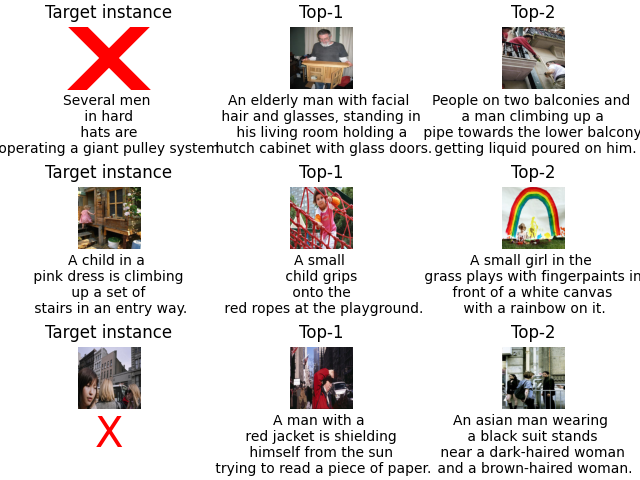
We can visualize the top-2 retrieved instances for a given target sample. Here we focus on qualitative inspection: looking at the images and reading the captions of the retrieved items to assess whether they are semantically similar to the target.
The target instance is displayed in the leftmost column, followed by the most similar instances in descending order of similarity. Note that some instances have missing modalities, which will not appear in the plot. In this example, the first two instances are missing the image modality, while the last one is missing the text modality.
nrows, ncols = 3,3
fig, axes = plt.subplots(nrows, ncols, constrained_layout=True)
for i in range(nrows*ncols):
    row, col = i//ncols, i%ncols
    ax = axes[i//ncols, col]
    ax.axis("off")
    if col == 0:
        image_to_show = Xs_test[0].iloc[row][0]
        caption = Xs_test[1].iloc[row][0]
        ax.set_title("Target instance")
    else:
        col -= 1
        try:
            retrieved_instance = preds["image"]["id"][row][col]
        except IndexError:
            retrieved_instance = preds["text"]["id"][row][col]
        retrieved_instance = memory_bank.loc[retrieved_instance]
        image_to_show = retrieved_instance["img_path"]
        caption = retrieved_instance["text"]
        ax.set_title(f"Top-{col+1}")

    if isinstance(image_to_show, str):
        image_to_show = Image.open(image_to_show).resize((512, 512), Image.Resampling.LANCZOS)
        ax.imshow(image_to_show)
    else:
        ax.plot(0.5, 0.5, 'rx', markersize=100, markeredgewidth=10)
    if isinstance(caption, str):
        caption = caption.split(" ")
        if len(caption) >= 6:
            caption = caption[:len(caption) // 4] + ["\n"] + caption[len(caption) // 4:len(caption) // 4 * 2] + \
                      ["\n"] + caption[len(caption) // 4 * 2:len(caption) // 4 * 3] + ["\n"] + caption[
                          len(caption) // 4 * 3:]
            caption = " ".join(caption)
        ax.annotate(caption, xy=(0.5, -0.08), xycoords='axes fraction', ha='center', va='top')
    else:
        ax.annotate("X", xy=(0.5, -0.08), xycoords='axes fraction', ha='center', va='top', color="red", fontsize=30)

shutil.rmtree(data_folder, ignore_errors=True)
Summary of results
We used the MCR retriever from iMML to identify the most relevant instances from a
memory bank, even when one of the modalities (image or text) was missing.
This example is intentionally simplified, using only a few instances for demonstration. For stronger performance and more reliable results, the full dataset should be used.
Conclusion
This example illustrates how iMML enables robust retrieval and similarity search in vision-language datasets, even in the presence of missing modalities.
Total running time of the script: (3 minutes 58.062 seconds)